Instructions to use PsiPi/NousResearch_Nous-Hermes-2-Vision-GGUF with libraries, inference providers, notebooks, and local apps. Follow these links to get started.
- Libraries
- llama-cpp-python
How to use PsiPi/NousResearch_Nous-Hermes-2-Vision-GGUF with llama-cpp-python:
# !pip install llama-cpp-python from llama_cpp import Llama llm = Llama.from_pretrained( repo_id="PsiPi/NousResearch_Nous-Hermes-2-Vision-GGUF", filename="NousResearch_Nous-Hermes-2-Vision-GGUF_Q2_K.gguf", )
llm.create_chat_completion( messages = [ { "role": "user", "content": [ { "type": "text", "text": "Describe this image in one sentence." }, { "type": "image_url", "image_url": { "url": "https://cdn.britannica.com/61/93061-050-99147DCE/Statue-of-Liberty-Island-New-York-Bay.jpg" } } ] } ] ) - Notebooks
- Google Colab
- Kaggle
- Local Apps Settings
- llama.cpp
How to use PsiPi/NousResearch_Nous-Hermes-2-Vision-GGUF with llama.cpp:
Install from brew
brew install llama.cpp # Start a local OpenAI-compatible server with a web UI: llama-server -hf PsiPi/NousResearch_Nous-Hermes-2-Vision-GGUF:Q2_K # Run inference directly in the terminal: llama-cli -hf PsiPi/NousResearch_Nous-Hermes-2-Vision-GGUF:Q2_K
Install from WinGet (Windows)
winget install llama.cpp # Start a local OpenAI-compatible server with a web UI: llama-server -hf PsiPi/NousResearch_Nous-Hermes-2-Vision-GGUF:Q2_K # Run inference directly in the terminal: llama-cli -hf PsiPi/NousResearch_Nous-Hermes-2-Vision-GGUF:Q2_K
Use pre-built binary
# Download pre-built binary from: # https://github.com/ggerganov/llama.cpp/releases # Start a local OpenAI-compatible server with a web UI: ./llama-server -hf PsiPi/NousResearch_Nous-Hermes-2-Vision-GGUF:Q2_K # Run inference directly in the terminal: ./llama-cli -hf PsiPi/NousResearch_Nous-Hermes-2-Vision-GGUF:Q2_K
Build from source code
git clone https://github.com/ggerganov/llama.cpp.git cd llama.cpp cmake -B build cmake --build build -j --target llama-server llama-cli # Start a local OpenAI-compatible server with a web UI: ./build/bin/llama-server -hf PsiPi/NousResearch_Nous-Hermes-2-Vision-GGUF:Q2_K # Run inference directly in the terminal: ./build/bin/llama-cli -hf PsiPi/NousResearch_Nous-Hermes-2-Vision-GGUF:Q2_K
Use Docker
docker model run hf.co/PsiPi/NousResearch_Nous-Hermes-2-Vision-GGUF:Q2_K
- LM Studio
- Jan
- vLLM
How to use PsiPi/NousResearch_Nous-Hermes-2-Vision-GGUF with vLLM:
Install from pip and serve model
# Install vLLM from pip: pip install vllm # Start the vLLM server: vllm serve "PsiPi/NousResearch_Nous-Hermes-2-Vision-GGUF" # Call the server using curl (OpenAI-compatible API): curl -X POST "http://localhost:8000/v1/chat/completions" \ -H "Content-Type: application/json" \ --data '{ "model": "PsiPi/NousResearch_Nous-Hermes-2-Vision-GGUF", "messages": [ { "role": "user", "content": [ { "type": "text", "text": "Describe this image in one sentence." }, { "type": "image_url", "image_url": { "url": "https://cdn.britannica.com/61/93061-050-99147DCE/Statue-of-Liberty-Island-New-York-Bay.jpg" } } ] } ] }'Use Docker
docker model run hf.co/PsiPi/NousResearch_Nous-Hermes-2-Vision-GGUF:Q2_K
- Ollama
How to use PsiPi/NousResearch_Nous-Hermes-2-Vision-GGUF with Ollama:
ollama run hf.co/PsiPi/NousResearch_Nous-Hermes-2-Vision-GGUF:Q2_K
- Unsloth Studio
How to use PsiPi/NousResearch_Nous-Hermes-2-Vision-GGUF with Unsloth Studio:
Install Unsloth Studio (macOS, Linux, WSL)
curl -fsSL https://unsloth.ai/install.sh | sh # Run unsloth studio unsloth studio -H 0.0.0.0 -p 8888 # Then open http://localhost:8888 in your browser # Search for PsiPi/NousResearch_Nous-Hermes-2-Vision-GGUF to start chatting
Install Unsloth Studio (Windows)
irm https://unsloth.ai/install.ps1 | iex # Run unsloth studio unsloth studio -H 0.0.0.0 -p 8888 # Then open http://localhost:8888 in your browser # Search for PsiPi/NousResearch_Nous-Hermes-2-Vision-GGUF to start chatting
Using HuggingFace Spaces for Unsloth
# No setup required # Open https://huggingface.co/spaces/unsloth/studio in your browser # Search for PsiPi/NousResearch_Nous-Hermes-2-Vision-GGUF to start chatting
- Docker Model Runner
How to use PsiPi/NousResearch_Nous-Hermes-2-Vision-GGUF with Docker Model Runner:
docker model run hf.co/PsiPi/NousResearch_Nous-Hermes-2-Vision-GGUF:Q2_K
- Lemonade
How to use PsiPi/NousResearch_Nous-Hermes-2-Vision-GGUF with Lemonade:
Pull the model
# Download Lemonade from https://lemonade-server.ai/ lemonade pull PsiPi/NousResearch_Nous-Hermes-2-Vision-GGUF:Q2_K
Run and chat with the model
lemonade run user.NousResearch_Nous-Hermes-2-Vision-GGUF-Q2_K
List all available models
lemonade list
GGUF Quants by Twobob, Thanks to @jartine and @cmp-nct for the assists
It's vicuna ref: here
Caveat emptor: There is still some kind of bug in the inference that is likely to get fixed upstream. Just FYI

Nous-Hermes-2-Vision - Mistral 7B
In the tapestry of Greek mythology, Hermes reigns as the eloquent Messenger of the Gods, a deity who deftly bridges the realms through the art of communication. It is in homage to this divine mediator that I name this advanced LLM "Hermes," a system crafted to navigate the complex intricacies of human discourse with celestial finesse.
Model description
Nous-Hermes-2-Vision stands as a pioneering Vision-Language Model, leveraging advancements from the renowned OpenHermes-2.5-Mistral-7B by teknium. This model incorporates two pivotal enhancements, setting it apart as a cutting-edge solution:
SigLIP-400M Integration: Diverging from traditional approaches that rely on substantial 3B vision encoders, Nous-Hermes-2-Vision harnesses the formidable SigLIP-400M. This strategic choice not only streamlines the model's architecture, making it more lightweight, but also capitalizes on SigLIP's remarkable capabilities. The result? A remarkable boost in performance that defies conventional expectations.
Custom Dataset Enriched with Function Calling: Our model's training data includes a unique feature โ function calling. This distinctive addition transforms Nous-Hermes-2-Vision into a Vision-Language Action Model. Developers now have a versatile tool at their disposal, primed for crafting a myriad of ingenious automations.
This project is led by qnguyen3 and teknium.
Training
Dataset
- 220K from LVIS-INSTRUCT4V
- 60K from ShareGPT4V
- 150K Private Function Calling Data
- 50K conversations from teknium's OpenHermes-2.5
Usage
Prompt Format
- Like other LLaVA's variants, this model uses Vicuna-V1 as its prompt template. Please refer to
conv_llava_v1in this file - For Gradio UI, please visit this GitHub Repo
Function Calling
- For functiong calling, the message should start with a
<fn_call>tag. Here is an example:
<fn_call>{
"type": "object",
"properties": {
"bus_colors": {
"type": "array",
"description": "The colors of the bus in the image.",
"items": {
"type": "string",
"enum": ["red", "blue", "green", "white"]
}
},
"bus_features": {
"type": "string",
"description": "The features seen on the back of the bus."
},
"bus_location": {
"type": "string",
"description": "The location of the bus (driving or pulled off to the side).",
"enum": ["driving", "pulled off to the side"]
}
}
}
Output:
{
"bus_colors": ["red", "white"],
"bus_features": "An advertisement",
"bus_location": "driving"
}
Example
Chat
Function Calling
Input image:
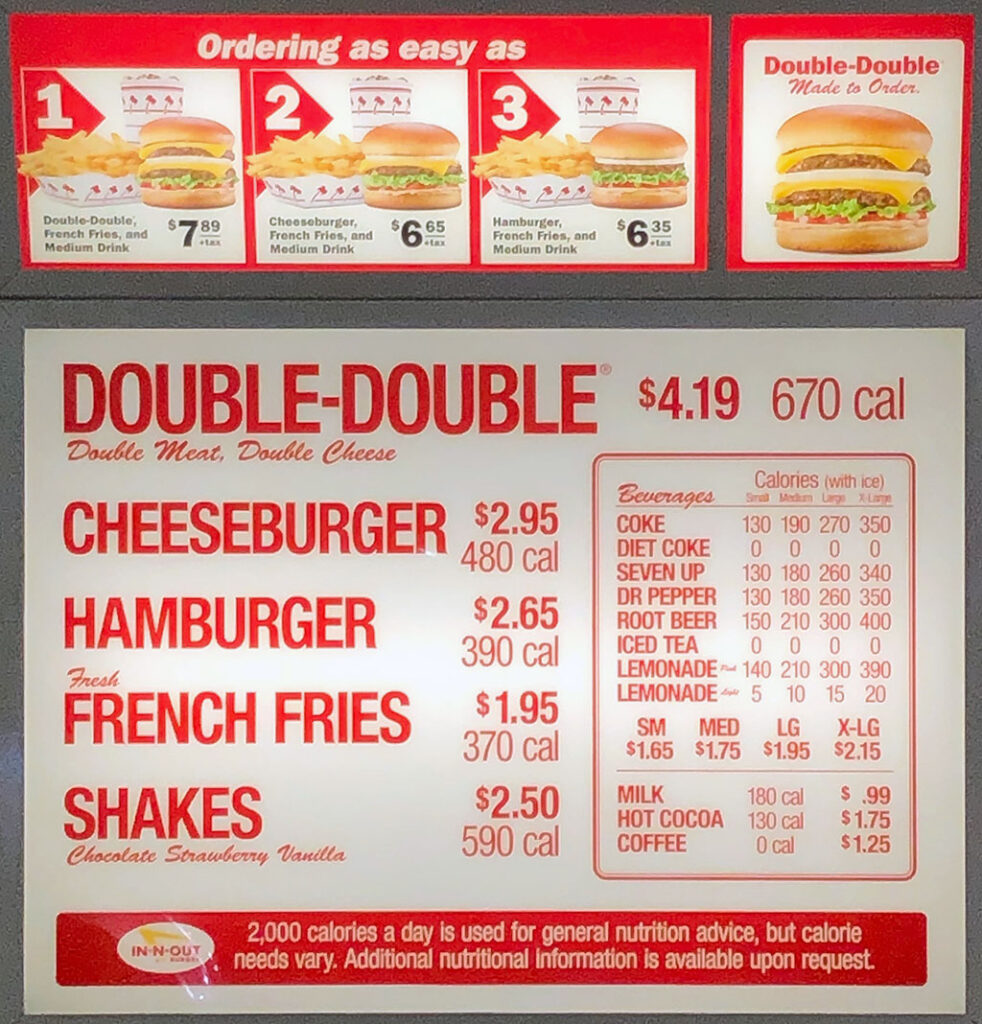
Input message:
<fn_call>{
"type": "object",
"properties": {
"food_list": {
"type": "array",
"description": "List of all the food",
"items": {
"type": "string",
}
},
}
}
Output:
{
"food_list": [
"Double Burger",
"Cheeseburger",
"French Fries",
"Shakes",
"Coffee"
]
}
- Downloads last month
- 305
2-bit
4-bit
5-bit
Model tree for PsiPi/NousResearch_Nous-Hermes-2-Vision-GGUF
Base model
mistralai/Mistral-7B-v0.1
