SDAR
Collection
The models without suffixes use the default block size = 4. • 21 items • Updated • 9
SDAR (Synergy of Diffusion and AutoRegression) model is a new large language model that integrates autoregressive (AR) and discrete diffusion modeling strategies. It combines the efficient training paradigm of AR models with the highly parallel inference capability of diffusion models, while delivering performance fully on par with SOTA open-source AR models. At the same time, SDAR sets a new benchmark as the most powerful diffusion language model to date. We highlight three major conclusions from our study:
Take-home message
- Balanced Efficiency: SDAR unifies the efficient training of AR models with the parallel inference of diffusion, achieving both fast training and inference.
- Fair Comparisons: In rigorously controlled experiments, SDAR achieves on-par general task performance with strong AR baselines, ensuring credibility and reproducibility.
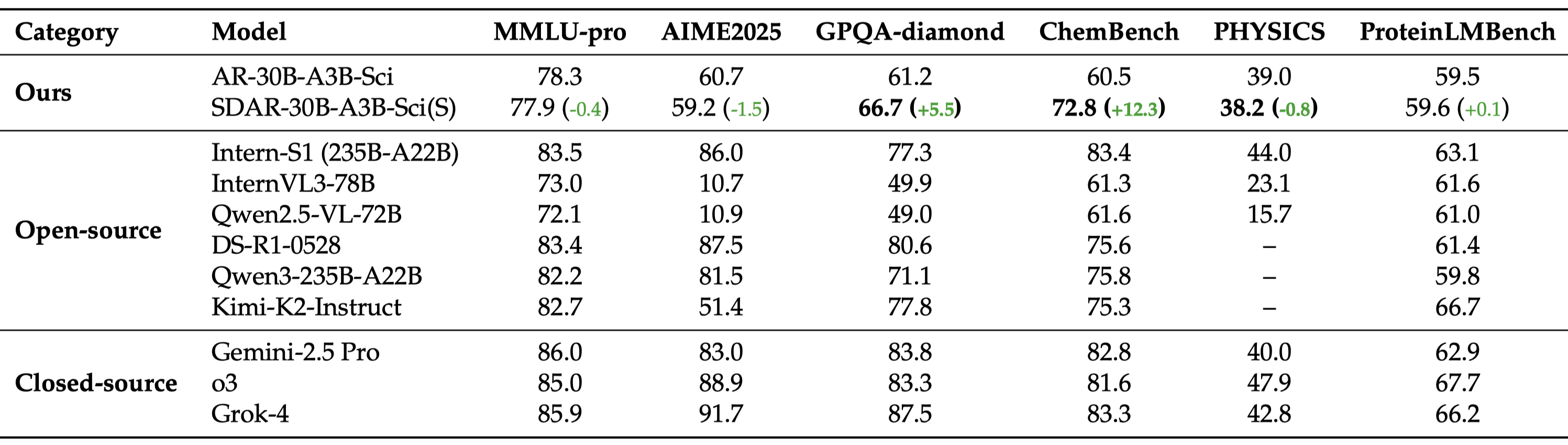
- Superior Learning Efficiency: On complex scientific reasoning tasks (e.g., GPQA, ChemBench, Physics), SDAR shows clear gains over AR models of the same scale, approaching or even exceeding leading closed-source systems.
JetEngine enables more efficient inference compared to the built-in implementation.
git clone https://github.com/Labman42/JetEngine.git
cd JetEngine
pip install .
The following example shows how to quickly load a model with JetEngine and run a prompt end-to-end.
import os
from jetengine import LLM, SamplingParams
from transformers import AutoTokenizer

model_path = os.path.expanduser("/path/to/your/sdar-model")
tokenizer = AutoTokenizer.from_pretrained(model_path, trust_remote_code=True)
# Initialize the LLM
llm = LLM(
    model_path,
    enforce_eager=True,
    tensor_parallel_size=1,
    mask_token_id=151669,   # Optional: only needed for masked/diffusion models
    block_length=4
)

# Set sampling/generation parameters
sampling_params = SamplingParams(
    temperature=1.0,
    topk=0,
    topp=1.0,
    max_tokens=256,
    remasking_strategy="low_confidence_dynamic",
    block_length=4,
    denoising_steps=4,
    dynamic_threshold=0.9
)

# Prepare a simple chat-style prompt
prompt = tokenizer.apply_chat_template(
    [{"role": "user", "content": "Explain what reinforcement learning is in simple terms."}],
    tokenize=False,
    add_generation_prompt=True
)

# Generate text
outputs = llm.generate_streaming([prompt], sampling_params)
For SDAR models, inference hyperparameters are set to: block_length = 4, denoising_steps = 4, greedy decoding.
For Qwen3-1.7B-AR-SFT and Qwen3-30B-AR-SFT, we use greedy decoding, and the base models Qwen3-1.7B-Base and Qwen3-30B-Base are derived from the Qwen3 Technical Report.
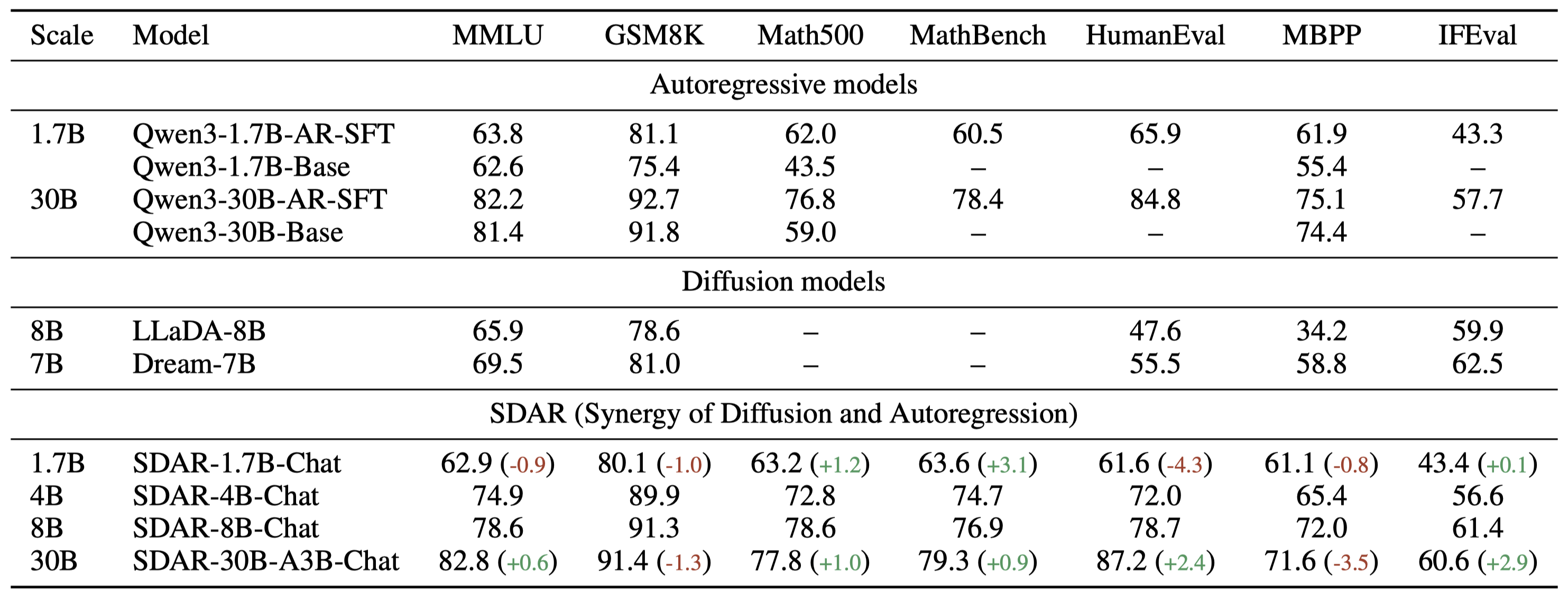
This table presents a controlled comparison between AR and SDAR under the same backbone and dataset settings. The results are averaged over 8 runs for GPQA, and over 32 runs each for AIME 2024, AIME 2025, and LiveMathBench.

This table positions SDAR-30B-A3B-Sci(sample) against leading open-source and closed-source LLMs. Scores for external models are sourced from the InternLM/Intern-S1 repository.