

Marco-Agent
Collection
4 items • Updated • 4
Importance-matrix (imatrix) GGUF quantized versions of AIDC-AI/Marco-DeepResearch-8B for use with llama.cpp and compatible inference engines.
For standard quantizations without importance matrix, see Marco-DeepResearch-8B-GGUF.
Marco DeepResearch is an efficient 8B-scale deep research agent developed by Alibaba International Digital Commerce (AIDC-AI), based on Qwen3-8B. It autonomously conducts open-ended investigations by integrating complex information retrieval with multi-step reasoning across diverse web sources. The model uses tools (search, visit) for iterative web research with built-in verification.
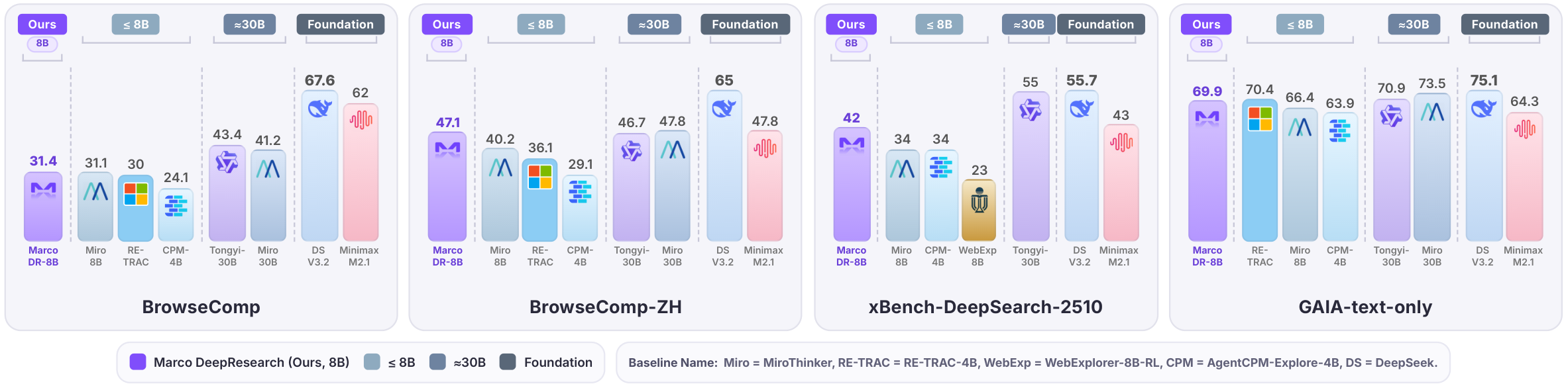
Under a maximum budget of 600 tool calls, Marco DeepResearch significantly outperforms other 8B-scale agents and surpasses or approaches several 30B-scale agents on challenging benchmarks.
Standard quantization treats all model weights equally when reducing precision. Importance matrix quantization improves on this by first profiling the model with calibration data to determine which weights matter most for output quality. During quantization, more important weights are preserved with higher precision while less critical weights are compressed more aggressively.
The result is significantly better quality at low bit rates (Q3, Q2, IQ3, IQ2, IQ1) compared to standard quantization. At higher bit rates (Q5, Q6), the difference is minimal. If you need to run at 3 bits or below, imatrix quants are strongly recommended.
Calibration data: WikiText-2
The imatrix.dat file (5.1 MB) is included in this repository. You can use it with llama.cpp's llama-quantize to create your own custom quantizations from a full-precision GGUF.
| Filename | Quant Type | Size | Description |
|---|---|---|---|
| Marco-DeepResearch-8B-i1-Q6_K.gguf | Q6_K | 6.3 GB | Very high quality. Near-lossless. |
| Marco-DeepResearch-8B-i1-Q5_K_M.gguf | Q5_K_M | 5.5 GB | High quality. Recommended for most users. |
| Marco-DeepResearch-8B-i1-Q5_K_S.gguf | Q5_K_S | 5.4 GB | High quality. Slightly smaller than Q5_K_M. |
| Marco-DeepResearch-8B-i1-Q4_1.gguf | Q4_1 | 4.9 GB | Good quality. Legacy 4-bit format. |
| Marco-DeepResearch-8B-i1-Q4_K_M.gguf | Q4_K_M | 4.7 GB | Good quality. Best 4-bit option. |
| Marco-DeepResearch-8B-i1-Q4_K_S.gguf | Q4_K_S | 4.5 GB | Good quality. Smaller than Q4_K_M. |
| Marco-DeepResearch-8B-i1-IQ4_NL.gguf | IQ4_NL | 4.5 GB | Good quality. Non-linear 4-bit quant. |
| Marco-DeepResearch-8B-i1-Q4_0.gguf | Q4_0 | 4.5 GB | Decent quality. Legacy 4-bit format. |
| Marco-DeepResearch-8B-i1-IQ4_XS.gguf | IQ4_XS | 4.3 GB | Decent quality. Smallest 4-bit variant. |
| Marco-DeepResearch-8B-i1-Q3_K_L.gguf | Q3_K_L | 4.2 GB | Moderate quality. imatrix helps noticeably here. |
| Marco-DeepResearch-8B-i1-Q3_K_M.gguf | Q3_K_M | 3.9 GB | Moderate quality. Good for memory-constrained setups. |
| Marco-DeepResearch-8B-i1-IQ3_M.gguf | IQ3_M | 3.7 GB | Moderate quality. Better than Q3_K_S at similar size. |
| Marco-DeepResearch-8B-i1-IQ3_S.gguf | IQ3_S | 3.6 GB | Lower quality. imatrix essential at this level. |
| Marco-DeepResearch-8B-i1-Q3_K_S.gguf | Q3_K_S | 3.6 GB | Lower quality. imatrix provides clear benefit. |
| Marco-DeepResearch-8B-i1-IQ3_XS.gguf | IQ3_XS | 3.4 GB | Lower quality. Aggressive compression. |
| Marco-DeepResearch-8B-i1-IQ3_XXS.gguf | IQ3_XXS | 3.2 GB | Low quality. For extreme memory constraints. |
| Marco-DeepResearch-8B-i1-Q2_K.gguf | Q2_K | 3.1 GB | Low quality. imatrix significantly helps. |
| Marco-DeepResearch-8B-i1-Q2_K_S.gguf | Q2_K_S | 2.9 GB | Very low quality. Experimental. |
| Marco-DeepResearch-8B-i1-IQ2_M.gguf | IQ2_M | 2.9 GB | Very low quality. Best option at ~2-bit. |
| Marco-DeepResearch-8B-i1-IQ2_S.gguf | IQ2_S | 2.7 GB | Very low quality. Heavy degradation expected. |
| Marco-DeepResearch-8B-i1-IQ2_XS.gguf | IQ2_XS | 2.6 GB | Extremely low quality. Research/testing only. |
| Marco-DeepResearch-8B-i1-IQ2_XXS.gguf | IQ2_XXS | 2.4 GB | Extremely low quality. Research/testing only. |
| Marco-DeepResearch-8B-i1-IQ1_M.gguf | IQ1_M | 2.2 GB | Minimal quality. Extreme compression research. |
| Marco-DeepResearch-8B-i1-IQ1_S.gguf | IQ1_S | 2.0 GB | Minimal quality. Maximum compression. |
You can use the included imatrix.dat to create your own quants:
./llama-quantize --imatrix imatrix.dat \
  Marco-DeepResearch-8B-f16.gguf \
  Marco-DeepResearch-8B-i1-<QUANT_TYPE>.gguf \
  <QUANT_TYPE>
CPU inference:
./llama-cli -m Marco-DeepResearch-8B-i1-Q5_K_M.gguf \
  -p "<your prompt>" \
  -n 4096 \
  --temp 0.7 --top-p 0.95 \
  -t $(nproc)
GPU-accelerated inference:
./llama-cli -m Marco-DeepResearch-8B-i1-Q5_K_M.gguf \
  -p "<your prompt>" \
  -n 4096 \
  --temp 0.7 --top-p 0.95 \
  -ngl 99
Server mode (OpenAI-compatible API):
./llama-server -m Marco-DeepResearch-8B-i1-Q5_K_M.gguf \
  --port 8080 \
  -ngl 99 \
  -c 32768
Create a Modelfile:
FROM ./Marco-DeepResearch-8B-i1-Q5_K_M.gguf

PARAMETER temperature 0.7
PARAMETER top_p 0.95
PARAMETER num_ctx 32768
Then:
ollama create marco-deepresearch -f Modelfile
ollama run marco-deepresearch
from llama_cpp import Llama

llm = Llama(
    model_path="Marco-DeepResearch-8B-i1-Q5_K_M.gguf",
    n_ctx=32768,
    n_gpu_layers=-1,  # Use all GPU layers; set to 0 for CPU-only
)

output = llm(
    "<your prompt>",
    max_tokens=4096,
    temperature=0.7,
    top_p=0.95,
)

print(output["choices"][0]["text"])
Marco-DeepResearch-8B-i1-Q4_K_M.gguf).This model uses a structured prompt format with <think>, <tool_call>, and <answer> tags.
You are an expert web researcher. Your task is to find accurate, complete answers through iterative search, extraction, and verification.

## Core Principles

1) Strategic Planning
   - Decompose complex questions into targeted sub-tasks
   - Choose the right tool for each step
   - Refine your approach based on what you learn

2) Precise Execution
   - Define clear objectives before using any tool
   - Provide sufficient detail for accurate results
   - Avoid vague or overly broad requests

3) Rigorous Verification
   - Cross-check important facts across multiple sources
   - Resolve conflicts by gathering additional evidence
   - Only conclude when evidence is sufficient and consistent

## Output Format

In each turn, you can either call a tool or provide the final answer.

**Call a tool:**
<think>your reasoning process</think>
<tool_call>
{"name": "tool_name", "arguments": {"param1": "value1", "param2": "value2"}}
</tool_call>

**Provide final answer (when you have gathered enough information):**
<think>your reasoning and analysis</think>
<answer>the direct answer to the question</answer>

Note: All reasoning should be in <think>, <answer> should contain only the final answer.

Current date: {current_date}

# Tools

You may call one or more functions to assist with the user query.

You are provided with function signatures within <tools></tools> XML tags:
<tools>
{tools_json}
</tools>

For each function call, return a json object with function name and arguments within <tool_call></tool_call> XML tags:
<tool_call>
{"name": <function-name>, "arguments": <args-json-object>}
</tool_call>
The model expects tools in OpenAI function calling format:
[
  {
    "type": "function",
    "function": {
      "name": "search",
      "description": "Search the web via Google to find relevant information and URLs.",
      "parameters": {
        "type": "object",
        "properties": {
          "querys": {
            "type": "array",
            "items": {"type": "string"},
            "description": "Search queries for finding relevant information."
          }
        },
        "required": ["querys"]
      }
    }
  },
  {
    "type": "function",
    "function": {
      "name": "visit",
      "description": "Read webpage content to extract specific information, verify claims, or understand context.",
      "parameters": {
        "type": "object",
        "properties": {
          "urls": {
            "type": "array",
            "items": {"type": "string"},
            "description": "URL(s) to visit."
          },
          "goal": {
            "type": "string",
            "description": "The specific information to retrieve. Be precise, not vague."
          }
        },
        "required": ["urls", "goal"]
      }
    }
  }
]
Tool call turn:
<think>
I need to search for information about X to answer the user's question.
</think>
<tool_call>
{"name": "search", "arguments": {"querys": ["search query here"]}}
</tool_call>
Final answer turn:
<think>
Based on the evidence gathered from multiple sources, I can now conclude that...
</think>
<answer>
The direct answer to the question.
</answer>
Evaluated on a suite of deep search benchmarks under a maximum budget of 600 tool calls (results from the original unquantized model).
This is a quantized version of AIDC-AI/Marco-DeepResearch-8B. Please refer to the original model card for full details on training methodology, intended use, and limitations.
@article{zhu2026marco,
  title={Marco DeepResearch: Unlocking Efficient Deep Research Agents via Verification-Centric Design},
  author={Bin Zhu and Qianghuai Jia and Tian Lan and Junyang Ren and Feng Gu and Feihu Jiang and Longyue Wang and Zhao Xu and Weihua Luo},
  journal={arXiv preprint arXiv:2603.28376},
  year={2026}
}
This model is released under the Apache 2.0 License.
1-bit
2-bit
3-bit
4-bit
5-bit
6-bit